How to Publish a Public Booking Page for Your Vacation Property
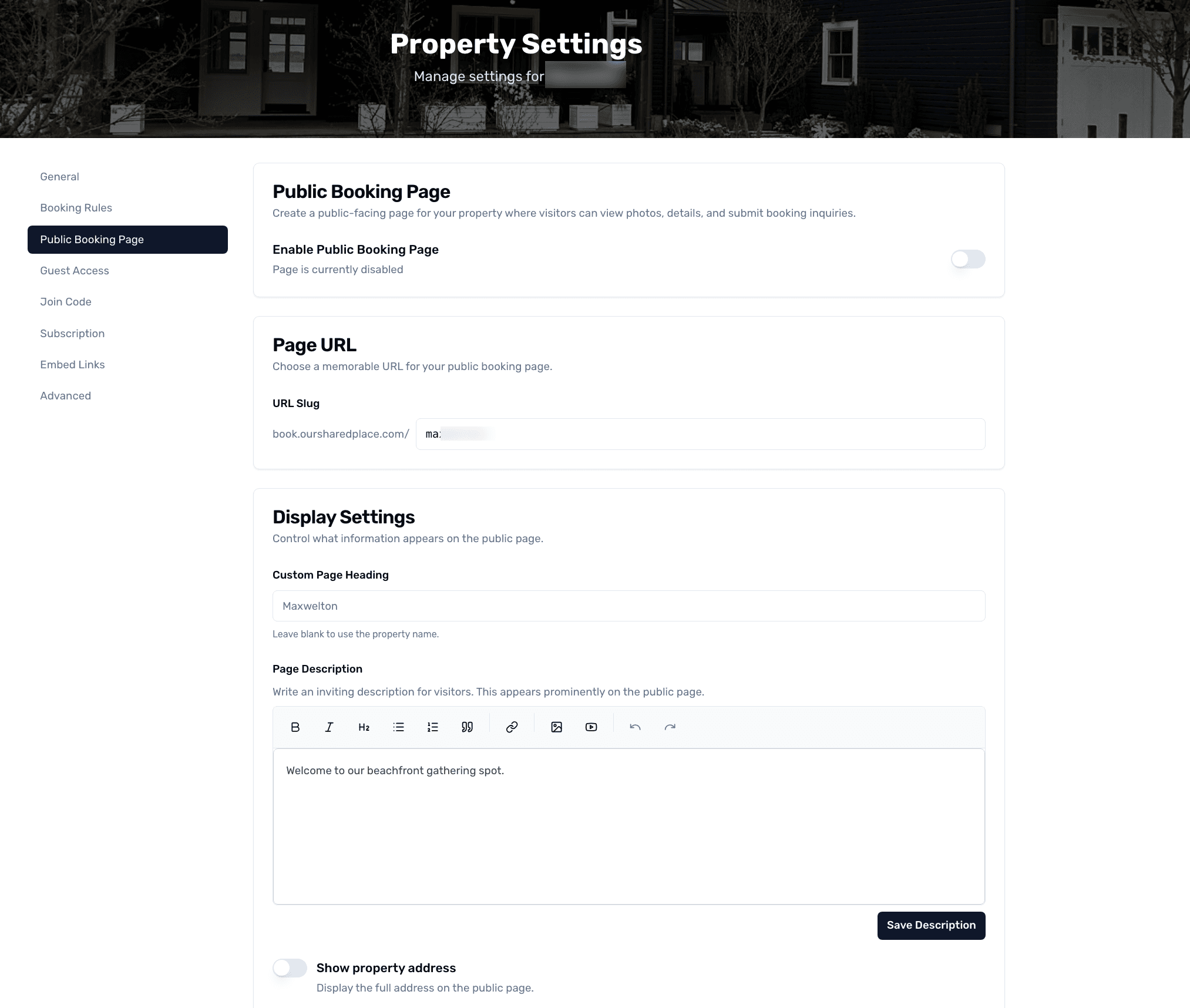
If you occasionally rent out your shared vacation property to friends-of-friends or a wider audience, OurSharedPlace gives each property its own public booking page at book.oursharedplace.com. Outside requests come in as inquiries that admins can approve like any other booking — no third-party listing site fees.
Step-by-step
- 1
Open public booking page settings
From your property settings, open Public Booking Page. Toggle 'Enable public page' on. Pick a slug — this becomes the URL: book.oursharedplace.com/your-slug.
Public booking page for a shared vacation property
- 2
Customize the page
Add a description, photos, and a short list of house highlights. The page also pulls your property's published photos from the gallery.
- 3
Set what visitors can do
Choose whether visitors can submit a booking request (with their dates and contact info) or just see availability. Inquiries land in your admin queue for approval.
- 4
Share the URL
Promote the URL on social, in your email signature, or anywhere else you market the property. The page is fully indexable by Google for shared vacation property searches.
Tips
- The public page never shows member contact info — incoming inquiries are routed through OurSharedPlace.
- Disable the public page at any time and the URL stops resolving.