Introducing Reusable Checklists
Build a checklist once — for departure, cleaning, winterization, spring opening, anything — and run it every time it's needed. Optimised for an iPad in the kitchen and tap-friendly for guests on their way out the door.
The thing that should not be a one-off
At a shared property, the same lists keep getting written. The departing guest needs to strip beds, lock the windows, and check the thermostat. Every fall someone has to drain the pipes. Every spring someone has to bring it back online. The cleaning crew wants the same list every visit.
Until now most owners did this with a printed sheet on the fridge or a Note in a group chat. The problem isn't the list — it's that the state never persists between people. You can't see what was done, by whom, when, or whether anything was missed.
How it works
- Build the list in Edit mode. Add items, drop in optional notes, drag them into the order you want. Each item can also link to a how-to article (so “drain the pipes” can point to a blog post with the video walkthrough).
- Click Save when it's ready. The structure locks. From here on, it behaves like a proper checklist — items can be ticked, but no one can accidentally delete or rearrange them.
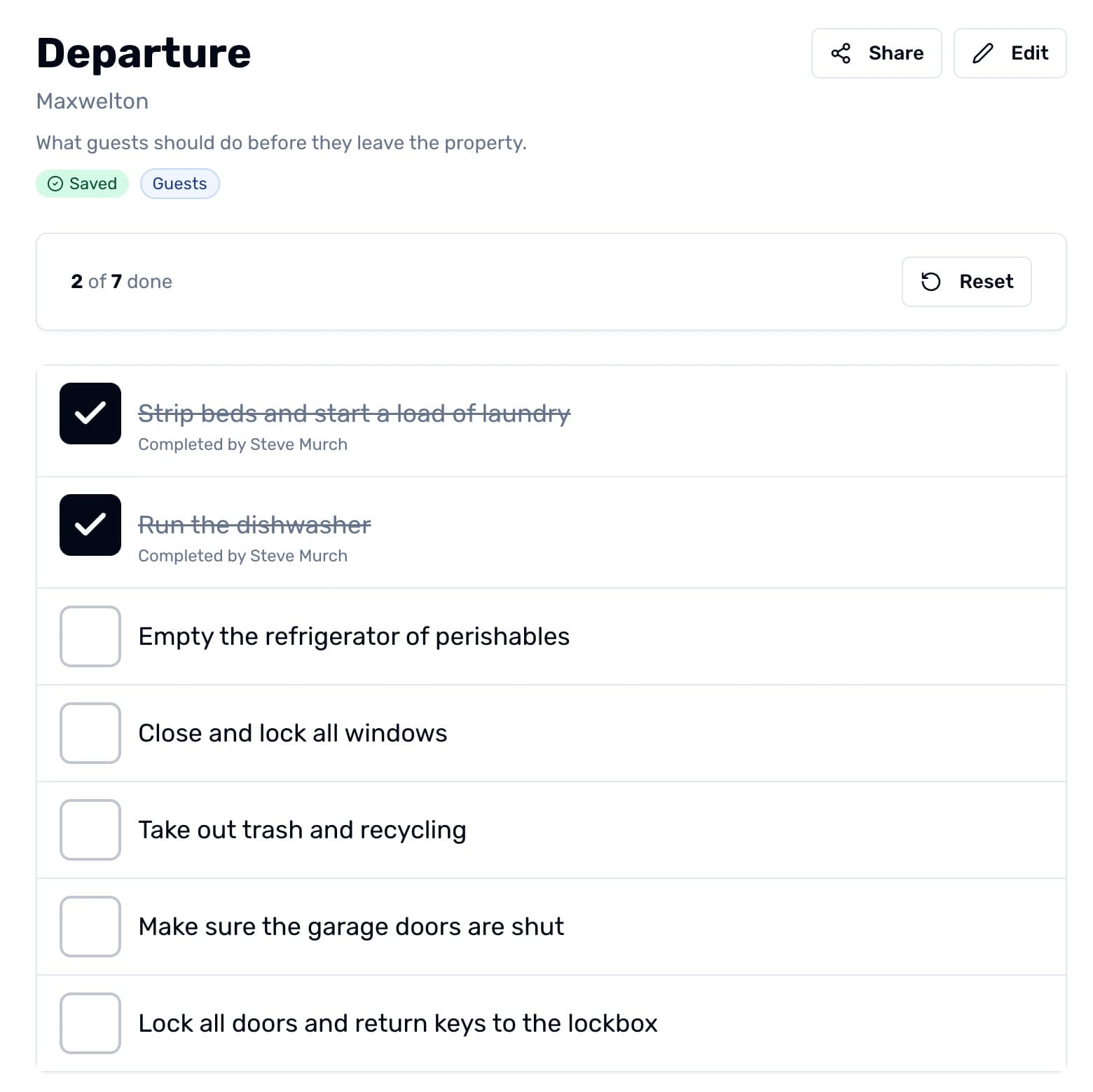
- Run it. Anyone with access taps each item as they finish it. Their name (or a guest's first name) gets attached to the completed item, so the next person can see who did what.
- Reset for next time. A single tap clears all the checks for the next person walking through. The completion stats get logged to history, so you have a record of every run.
- Reopen for editing later when the list needs to evolve. Editing doesn't reset in-progress state — it just unlocks the structure.
Built for tablets
Checkboxes are big. Tappable surfaces are big. The text reads from across the kitchen. We assume someone is walking around the property with the device in one hand, ticking things off as they go.
Tap the checkbox or the line of text — both work. Drag-handle reorder is one finger. When everyone's done, the page lights up with a small confetti burst and waits for someone to hit Reset.
Share it without making people sign in
Guests don't want to make accounts. Cleaners don't want to make accounts. Click the Share button on a saved checklist and you get a public URL you can email, paste into a welcome message, drop into Home Assistant, or print as a QR code on the kitchen wall. Anyone with the link can tap items off — no sign-in needed.
The first tap prompts for a first name so attribution still works. After that, every tick records who completed it. The link is token-protected (revoke it from property settings any time), and you control which checklists are reachable that way.
Already in the Guest Portal
Any saved checklist with visibility set to Guests or Public shows up automatically on the Guest Portal page you send to a stay's guests. They can tick items off without a separate sign-in, alongside the photos, articles, and contact information you already share there.
Visibility you already understand
Each checklist uses the same four-level visibility model as blog articles: Admins, Members, Guests, and Public. An internal maintenance checklist can stay admin-only; a departure checklist can be marked Public so it appears on the property's embedded dashboard surface.
The Share button works regardless of visibility — visibility controls who sees the list inside the app, while the share link is for anyone the admin chooses to send it to.
Sensible defaults out of the box
Every new property gets five starter checklists already filled in:
- Upon Arrival — Find the lockbox, locate the WiFi, set the thermostat, review house rules.
- Departure — Strip the beds, run the dishwasher, clear the fridge, close up.
- Cleaning — Standard turnover between stays.
- Winterize — Shut off water, drain pipes, set the thermostat for winter.
- Reopen for the Season — Bring the property back online in spring.
Edit them, delete the ones you don't need, or add your own. You probably don't want them all — that's fine. The trash icon on each card removes a checklist cleanly.
Why this matters for shared properties
Most coordination problems at shared properties trace back to missing or invisible state. Did the previous group really lock the back door? Did anyone unplug the iron after that one incident? Did we drain the outdoor hose this fall, or are we repairing a burst pipe in March?
Reusable Checklists make that state visible — to whoever's there now, to whoever shows up next, and to the admin keeping an eye on the season. Less “did anyone…?” in the group chat, more “already done, see the list.”